Technical Case Study

8.5x Faster Distributed Training

RDMA on Bare Metal Kubernetes

How we helped a computer vision company deploy bare metal Kubernetes with GPUDirect RDMA over RoCE for high-performance ML workloads

10xAllReduce Latency ImprovementFrom ~100ms to ~10ms
8.5xTraining Throughput IncreaseFor BERT-sized models
78%GPU UtilizationUp from 35%
4 days → 11 hrsTime-to-Train ReductionFor production models

Executive Summary

A mid-sized computer vision company had invested in GPU infrastructure for their ML platform but hit a wall: distributed training jobs that should complete in hours were taking days. Their data science team was frustrated, GPU utilization was under 40%, and leadership was questioning the ROI of their hardware investment.

The root cause: network bottlenecks. Without RDMA, gradient synchronization between GPUs was crawling over TCP/IP, burning expensive GPU cycles waiting on the network. Their RTX A5000 and A5500 cards sat idle during AllReduce operations while the CPU copied data between system memory and network buffers.

We implemented a complete network redesign using GPUDirect RDMA over RoCE (RDMA over Converged Ethernet), integrated with their existing Kubernetes infrastructure through the NVIDIA Network Operator and Multus CNI.

The Challenge

Client Context

The client, a mid-sized computer vision company, had built an on-premises ML platform to train object detection and image segmentation models. Privacy requirements and data residency regulations made cloud training impractical for their most sensitive workloads.

Their Infrastructure

  • 2 Dell Precision workstations: one with RTX A5000 (2 GPUs), one with RTX A5500 (2 GPUs)
  • Bare metal Kubernetes cluster (Ubuntu 24.04, K8s 1.29)
  • NVIDIA GPU Operator for device management
  • Calico CNI for pod networking
  • NFS for shared storage, local NVMe for scratch space
  • KAI Scheduler for GPU-aware job scheduling

The Problem

Training jobs that used all 4 GPUs across both nodes were painfully slow. A BERT-base fine-tuning job that benchmarked at 6 hours on a single 8-GPU cloud instance was taking over 50 hours on their 4-GPU cluster.

SymptomObservedExpected
GPU utilization during training30-40%>80%
AllReduce time per iteration~400ms<50ms
Network throughput during sync~800 Mbps>10 Gbps
CPU utilization during sync85%+ (single core)<10%

Root Cause Analysis

We identified three compounding issues:

1
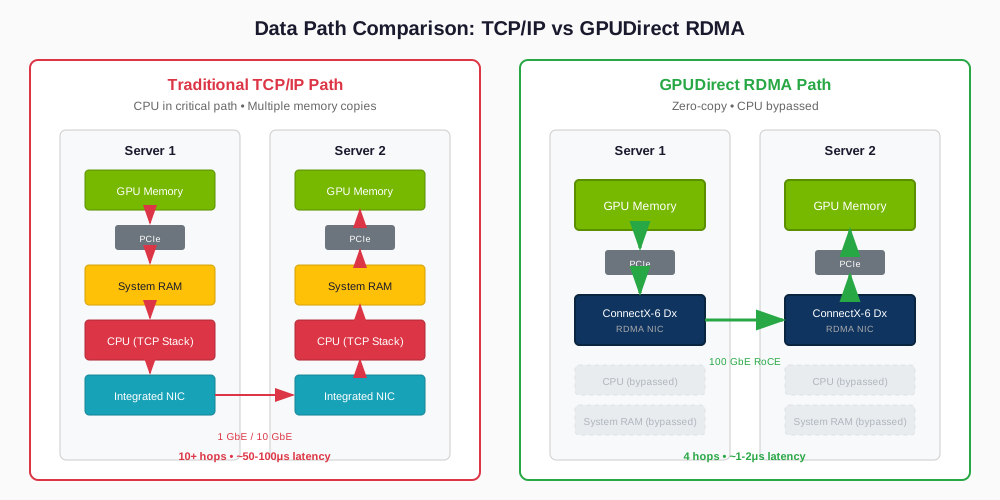
No RDMA capability. The integrated NICs didn't support RDMA. Every gradient sync required: GPU memory → PCIe → System RAM → CPU (TCP/IP stack) → NIC → Wire → NIC → CPU → System RAM → PCIe → GPU memory. The CPU was in the critical path for every byte transferred.
2
No GPUDirect. Without GPUDirect RDMA, NCCL fell back to the Socket transport. Each AllReduce operation involved multiple memory copies and CPU intervention, adding 50-100μs of latency per operation.
3
Inadequate bandwidth. Even ignoring latency, 1GbE (125 MB/s) couldn't move a 400MB gradient payload fast enough. At theoretical maximum, that's 3.2 seconds per AllReduce—just for the network transfer.
Comparison diagram showing TCP/IP data path with multiple memory copies through CPU versus RDMA direct path bypassing CPU
TCP/IP Data Path vs RDMA Data Path

The math was clear: to make distributed training viable, they needed 100x bandwidth improvement and 10-50x latency reduction. That meant RDMA.

Solution Architecture

Technology Selection: RoCE vs InfiniBand

For RDMA, there are two main options: InfiniBand and RoCE (RDMA over Converged Ethernet). We evaluated both:

FactorInfiniBand (HDR/NDR)RoCE v2 (100GbE)
Bandwidth200-400 Gb/s100 Gb/s
Latency~0.5-1 μs~1-2 μs
Switch cost$15-40K (IB switch)$3-8K (DCB Ethernet)
NIC cost~$1,500-3,000~$500-1,000
Expertise requiredSpecializedFamiliar to network teams

Decision: RoCE v2

For a 2-4 node deployment, RoCE offers 95% of InfiniBand's performance at 30% of the cost. The slight latency penalty (1-2μs vs 0.5-1μs) is negligible for gradient payloads measured in hundreds of megabytes.

Hardware Specification

ComponentSpecificationPurpose
NICNVIDIA ConnectX-6 Dx 100GbE (dual-port)RDMA-capable network interface
SwitchNVIDIA SN2201 or Dell S5248F-ONDCB-capable Ethernet with PFC/ECN
CablingDAC (Direct Attach Copper) or 100GbE QSFP28Node interconnect

Network Topology Design

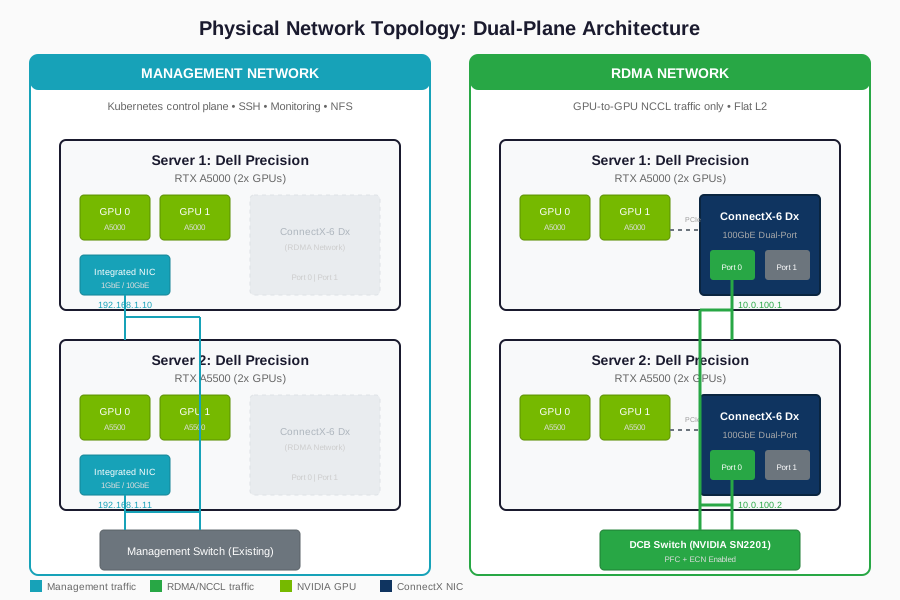
We designed a physically separated network architecture with two distinct planes:

Physical network topology showing separate management and RDMA networks connecting GPU servers
Physical Network Topology

Management Network (existing)

Integrated NICs connected to the existing management switch. Handles Kubernetes control plane, SSH access, monitoring, and NFS traffic. No changes required.

RDMA Network (new)

ConnectX-6 Dx NICs connected to a dedicated DCB switch. Handles only GPU-to-GPU NCCL traffic. Flat L2 network with PFC/ECN enabled.

Why Flat L2 (No VLANs, No VXLAN)

  • No VLANs needed: With only 2 nodes on a dedicated switch, there's nothing to segment.
  • No VXLAN: Encapsulation overhead kills RDMA performance. VXLAN adds headers and processing that defeat the purpose of zero-copy transfers.
  • Simple PFC configuration: Priority Flow Control is easier to configure and debug on a flat network.

Kubernetes Integration

The Multi-Network Challenge

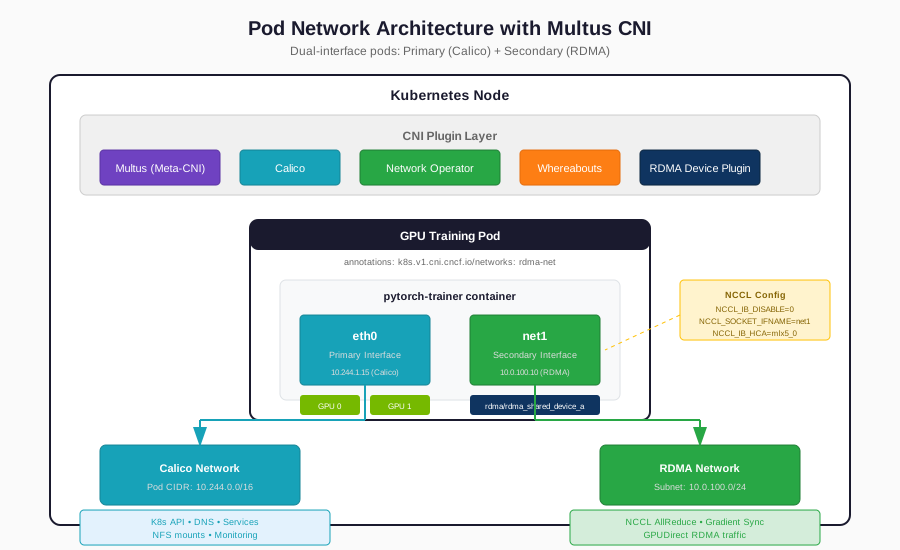
Kubernetes assumes a single network per pod. Our design requires pods to have two networks: the primary Calico network for Kubernetes services and a secondary RDMA network for NCCL traffic. This is where Multus CNI comes in.

Pod network architecture diagram showing eth0 for Calico and net1 for RDMA via Multus CNI
Pod Network Architecture with Multus CNI
eth0

Primary interface (Calico) for Kubernetes services, DNS, API server communication

net1

Secondary interface (RDMA) for NCCL collective operations

Component Stack

The complete Kubernetes stack for RDMA-enabled GPU training:

ComponentPurpose
CalicoPrimary CNI for pod networking
Multus CNIMeta-CNI for multiple network interfaces
NVIDIA Network OperatorRDMA drivers, device plugin, secondary networks
whereaboutsIPAM for secondary network
NVIDIA GPU OperatorGPU drivers, device plugin
KAI SchedulerGang scheduling for distributed jobs

SR-IOV vs Host-Device: A Critical Decision

ApproachHow It WorksProsCons
Host-DeviceEntire NIC moved into pod namespaceSimple, full performanceExclusive access—one job per NIC
SR-IOVVirtual Functions (VFs) carved from physical NICMultiple jobs share NICMore complex setup, ~5% overhead

Decision: Host-Device with Dual Ports

For this 2-node deployment running one distributed training job at a time, host-device provides the simplest path. The dual-port ConnectX-6 Dx gives us two RDMA resources per node, allowing two concurrent RDMA-enabled jobs if needed.

Distributed Training Setup

Framework: Kubeflow Training Operator

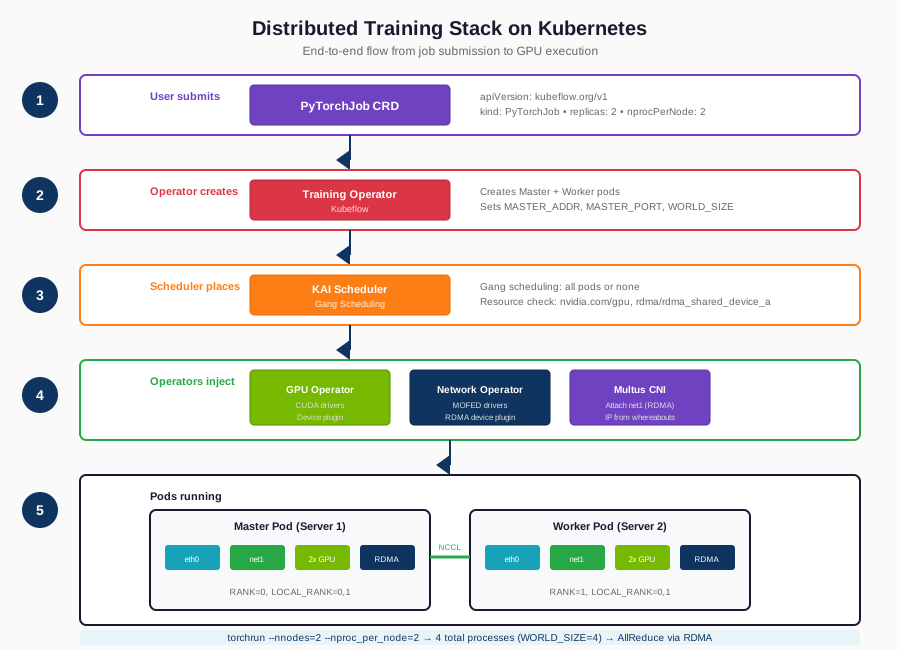
For running distributed PyTorch jobs on Kubernetes, we deployed the Kubeflow Training Operator. It provides PyTorchJob CRD for distributed PyTorch training, automatic worker discovery, rendezvous coordination, and integration with KAI Scheduler for gang scheduling support.

Distributed training stack diagram showing Kubeflow Training Operator, PyTorchJob, and KAI Scheduler integration
Distributed Training Stack

NCCL Configuration for RoCE

NCCL (NVIDIA Collective Communication Library) must be explicitly configured to use the RDMA interface. Key environment variables include enabling the InfiniBand/RoCE path, specifying the ConnectX-6 device name, and setting the correct RoCEv2 GID index.

Results

Performance Benchmarks

We benchmarked before and after using nccl-tests (all_reduce_perf) and real training workloads:

MetricBefore (TCP)After (RoCE)Improvement
AllReduce latency (100MB)~95 ms~9 ms10.5x
AllReduce bandwidth~800 Mbps~89 Gbps111x
GPU utilization (training)35%78%2.2x
BERT-base fine-tuning time52 hours6.1 hours8.5x
Checkpoint save (2GB)12 seconds1.8 seconds6.7x

Key Insight

The 8.5x training speedup was greater than expected. This is because reduced AllReduce time didn't just speed up synchronization—it allowed the GPUs to process more batches per unit time, compounding the gains.

Operational Impact

Model iteration time

Data scientists can now run 5-6 experiments per week instead of 1-2.

GPU ROI

Effective utilization more than doubled, improving the cost-per-trained-model significantly.

Team morale

No more babysitting multi-day training jobs or debugging mysterious slowdowns.

When to Use This Architecture

This solution is appropriate when:

  • You're running multi-node distributed training (DDP, FSDP, DeepSpeed)
  • Gradient payloads exceed 100MB (most modern models)
  • GPU utilization during training is under 60%
  • You control the hardware (on-prem, colo, bare metal cloud)

This solution is overkill when:

  • Training fits on a single node
  • You're doing inference only
  • You're on shared cloud infrastructure without RDMA support

Facing Similar Challenges?

If you're dealing with GPU infrastructure challenges—utilization, performance, reliability, or building something new—we should talk. No sales pitch. Just a conversation about what you're trying to do and whether we can help.

Schedule a Call